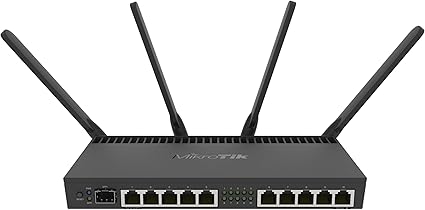
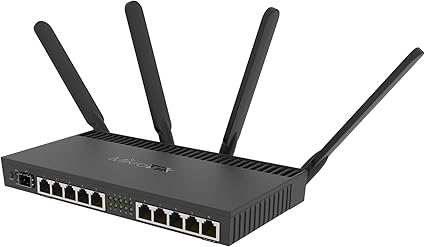
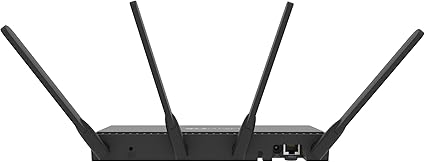
Description MikroTik RB4011IGS 5HACQ2HND-IN – High-Performance Router with Dual Band Wi-Fi The MikroTik RB4011IGS 5HACQ2HND-IN is an advanced router that combines powerful networking capabilities with the convenience of dual-band Wi-Fi. Designed for both small to medium-sized businesses and demanding home users, this versatile device offers an impressive set of features to enhance your network performance and reliability. Key Features Robust CPU: The RB4011IGS 5HACQ2HND-IN is powered by a quad-core 1.4 GHz CPU, providing exceptional processing power for high-speed data handling. This ensures smooth performance even when managing multiple simultaneous connections. Comprehensive Port Configuration: This router features five Gigabit Ethernet ports, which allow for fast wired connections to devices such as computers, printers, and servers. Additionally, it includes two SFP ports for fiber connectivity, enhancing your network’s scalability and speed. Dual-Band Wireless: The RB4011IGS 5HACQ2HND-IN supports both 2.4 GHz and 5 GHz wireless frequencies, providing flexibility and improved performance for various applications. The dual-band capability minimizes interference and maximizes throughput, making it ideal for environments with multiple devices. High-Performance Wi-Fi: With 802.11ac technology, this router delivers high-speed wireless connectivity, reaching up to 1300 Mbps on the 5 GHz band and 400 Mbps on the 2.4 GHz band. This makes it perfect for streaming, gaming, and other bandwidth-intensive tasks. Power over Ethernet (PoE) Support: The RB4011IGS 5HACQ2HND-IN supports PoE, allowing you to power connected devices like access points and cameras directly through the Ethernet cable. This simplifies installation and reduces cable clutter. RouterOS: RB4011IGS 5HACQ2HND-INruns on MikroTik’s RouterOS, offering extensive features for network management. With advanced routing protocols, firewall options, and VPN capabilities, users can customize their network to meet specific needs. Enhanced Security: Built-in security features, including a firewall and user authentication options, help protect your network from unauthorized access and cyber threats. This ensures a secure online environment for all users. Compact Design: The RB4011IGS 5HACQ2HND-IN is housed in a sleek, durable metal case that allows for easy installation in various environments, including home offices and server rooms. User-Friendly Interface: The intuitive web-based management interface, along with Winbox and mobile app access, makes configuring and managing the router straightforward, even for those without extensive networking experience. Applications Small to Medium-Sized Businesses: The RB4011IGS 5HACQ2HND-IN is perfect for businesses needing reliable internet connectivity, efficient routing, and secure VPN access. It can support multiple users and devices, ensuring smooth operation. Home Networks: For tech-savvy home users, this router provides the performance needed for streaming, online gaming, and connecting smart home devices. The dual-band Wi-Fi ensures that all devices receive optimal connectivity. Educational Institutions: Schools and universities can utilize the RB4011IGS 5HACQ2HND-IN to provide students and staff with reliable internet access, enabling effective learning and collaboration. Data Centers: RB4011IGS 5HACQ2HND-IN has high-performance capabilities make it suitable for data center applications where efficient routing and high throughput are crucial. Installation Guide Unbox the Device: Carefully remove the RB4011IGS 5HACQ2HND-IN from its packaging and verify the included accessories, such as the power supply and mounting brackets. Select an Installation Location: Choose a well-ventilated location for the router. It can be mounted in a standard 1U rack space or placed on a shelf. Connect Power: Plug the included power adapter into the router and connect it to a power outlet. The router will power on, and LED indicators will show its operational status. Connect Network Devices: Use Ethernet cables to connect your devices to the Gigabit Ethernet ports. For fiber connections, install appropriate SFP modules in the SFP ports. Access the Management Interface: Connect a computer to one of the Ethernet ports and access the web-based management interface using the default IP address (usually 192.168.88.1). Log In and Configure: Use the default credentials (admin/admin) to log in. Configure your network settings, including DHCP, firewall rules, and VPN access according to your requirements. Monitor Performance: Utilize the management interface to monitor network performance and make adjustments as needed based on user demand. Advantages of RB4011IGS 5HACQ2HND-IN High Throughput: The powerful CPU and multiple Gigabit Ethernet ports ensure that the RB4011IGS 5HACQ2HND-IN can handle high data throughput efficiently. Dual-Band Wi-Fi: With the ability to operate on both the 2.4 GHz and 5 GHz bands, this router minimizes interference and maximizes connectivity for various devices. User-Friendly Management: The intuitive web-based interface and mobile app access provide straightforward configuration options, making it accessible for users of all skill levels. Robust Security: The built-in security features help protect your network, ensuring safe access for all users. Durable and Compact Design: The metal casing and compact form factor ensure that the RB4011IGS 5HACQ2HND-IN is both durable and space-efficient. Conclusion The MikroTik RB4011IGS 5HACQ2HND-IN is a high-performance router that caters to the needs of small and medium-sized networks. With its quad-core CPU, versatile connectivity options, and advanced RouterOS capabilities, it offers a comprehensive solution for efficient network management and secure connectivity. Whether used in a business, educational setting, or home environment, the RB4011IGS 5HACQ2HND-IN delivers reliable performance, ensuring that your network is equipped to handle modern applications and services with ease. By choosing the RB4011IGS 5HACQ2HND-IN, users can build a robust network infrastructure that supports current and future demands, enhancing productivity and connectivity.